

Two different problems
If you’re wondering why your website is not showing on Google, the answer is almost always one of two things.
Either Google can’t list your pages at all, or it lists them but doesn’t think they deserve a high spot for the searches you care about.
The fix for each is completely different, so the first job is working out which one you’ve got.
I’ll take you through that below, then show you what our Technical SEO Report does if you’d rather have someone check the lot for you.
If Google hasn’t listed (indexed) a page, it can’t show up in search, however good it is.
Is Google even listing your website?
Google calls being listed “indexed“. An indexed page is one Google has found, read and stored, which means it’s allowed to show it.
A page that isn’t indexed can’t show up at all, however good it is.
There are three quick checks.
Your business name
Type your business name into Google.
If your site doesn’t appear, that’s a warning sign, though a brand-new site can take a while.
The site: search
Type site:yourwebsite.co.nz into Google, using your own address.
That lists the pages Google knows about, and if nothing comes back, Google hasn’t indexed you.
Search Console
Open Google Search Console, which is Google’s free tool for site owners, and paste a page address into the box at the top.
It tells you whether that page is on Google and, if it isn’t, usually why.
What stops Google from listing a page?
The usual causes are easy to miss.
- A setting in WordPress called “discourage search engines from indexing this site” can be left switched on from when the site was being built.
- A “noindex” tag on a page tells Google to leave it out.
- A robots file can tell Google to keep away altogether.
- Pages that return an error can’t be listed.
- Sometimes Google has simply never been told your site exists.
You can’t see any of these by looking at the website. It looks fine to you and invisible to Google, which is why so many owners go months without noticing.
Why is my website not showing on Google when it is listed?
Being listed is only the starting line. Ranking depends on whether your pages match what people actually type into Google.
The common reasons a site sits on page five are these.
- Page titles that don’t say what you do.
- Several pages all aiming at the same search, so they compete with each other.
- A slow site, especially on a phone.
- Few other websites pointing to you while your competitors have plenty.
- Sometimes you’re simply up against much bigger businesses for a very busy search, and the realistic win is a more specific one.
If you’re a plumber in Tauranga, “plumber” is a hard fight.
“Emergency plumber Tauranga” is a fairer one. Google rewards pages that clearly answer a specific question.
How do you check your website’s SEO yourself?
SEO just means helping Google find and show your website. A basic check, which some people call a DIY SEO audit, goes in this order.
- Can Google list your pages?
- Is the site fast on a phone?
- Do the page titles and descriptions say what each page is about?
- Do any links lead to dead pages?
- Who else links to you?
Free tools will get you part of the way, and Search Console is the most useful because it shows real searches and real visits rather than guesses.
The hard part is knowing what to do with the numbers, and in what order.
A list of 40 things to fix isn’t much use if nobody tells you which three matter first.
What does a Technical SEO Report look at?
Our Technical SEO Report is a health check of your whole website, built from real numbers: your own Google data, plus a live crawl of your site, speed tests, links, competitor keywords, Google Maps results and AI answers.
It starts with how people find you on Google: your real visits, the searches they used and your top pages.
- A health score covering speed, pages Google can’t list, broken links and how the site works on a phone.
- Your page titles, descriptions and headings are checked, with fixes ready to paste in.
- Your Google Business Profile and your map results are covered too, because the full Local SEO Report is included in it.
- Who links to you and how you compare with your competitors, and it checks whether Google’s AI answers mention you.
Everything ends in one ranked fix list that says who should do each fix, so you aren’t left guessing whether it’s a job for you, your web person or someone else.
Here are two pages from Seed Studio’s own report, run on our own site.
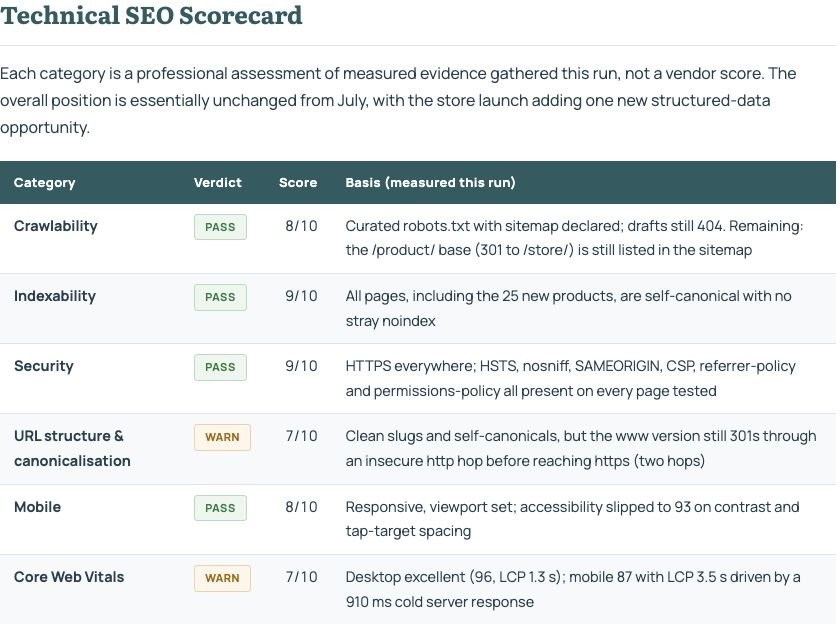
The scorecard from our own site’s report: each area gets a verdict and a score.

The ranked fix list. High items first.
Who is a Technical SEO Report for?
Any business with a website that wants to know what’s holding it back.
That includes a new site that never seems to appear, an older site that has gone quiet, and a site you’ve paid for but never checked.
If you don’t know whether your problem is “not listed” or “listed but not ranking”, the report answers that with measured evidence instead of a guess.
What do we need from you?
Access to your Google Search Console and Google Analytics, and we send you the steps for setting that up.
Once we have that, the report is usually delivered in about 5 business days, depending on workload.
A rough idea of how big your site is helps too, though you don’t need an exact page count.
Doing the fixes isn’t part of the report. It tells you what to fix and who should do it, and we can quote if you’d like us to do the work.
You can see how the Technical SEO Report works or look at all our reports to see which one fits your question.
Why did we build it?
Most of the businesses we work with don’t know reports like this exist.
They’re built on real search data from Google.
- Google’s search trends tell you when to do things.
- Search Console shows what people search to find you.
- Analytics shows what they do once they’re on your site.
- Google Ads can fill the gaps for searches you’re not reaching yet.
This report is the one that starts with the health of the website itself, because there’s no point working on anything else if Google can’t read your site properly.
What should you do next?
Start with the three quick checks near the top of this post. If Google isn’t listing your site, fix that before anything else: check the WordPress setting, look for a noindex tag and test a page in Search Console.
If you are listed, open Search Console’s performance view, look at which searches already bring people to you, and make sure the page titles for those pages say plainly what you offer.
Then look at how the site loads on your own phone. If you get stuck, or you’d like the whole picture in one document, that’s what the report is for.
Frequently asked questions
Why is my website not showing on Google?
Either Google can’t list your pages at all, or it lists them but doesn’t think they deserve a high spot for the searches you care about. The fix for each is completely different, so the first job is working out which one you’ve got.
How do I check if my website is on Google?
Type site:yourwebsite.co.nz into Google, using your own address. That lists the pages Google knows about, and if nothing comes back, Google hasn’t indexed you.
Why is my website not ranking on Google?
Being listed is only the starting line. Ranking depends on whether your pages match what people actually type into Google.
How do I check my website's SEO myself?
Check whether Google can list your pages, whether the site is fast on a phone, whether the page titles and descriptions say what each page is about, whether any links lead to dead pages, and who else links to you. Search Console is the most useful free tool because it shows real searches and real visits rather than guesses.
How long does a new website take to show on Google?
It varies. Days to weeks is common, but I wouldn’t promise a date. Adding your site in Search Console and submitting your sitemap helps Google find it.
Can a good-looking website still not show up on Google?
Yes. A site can look great and still be hard for Google to read. How it looks and how Google reads it are two separate things.