

Keep it, fix it, merge it or remove it
Knowing how to do a content audit comes down to one question, asked of every page and post on your site: keep it, fix it, merge it or remove it?
You can do it yourself with a spreadsheet and a few free tools, and I’ll show you how below.
If you’d rather have it done for you, our Content Review & Plan does this for every page and post on your site.
Give every page on your site one main search: the words a customer would type into Google to find it.
What is a content audit, and why bother?
A content audit is a look through everything on your website, pages and blog posts, to decide what each one is for and whether it’s doing its job.
Over the years most sites collect pages nobody planned: an old offer, three posts on nearly the same thing, a service page that never quite says what you do.
People find you on Google through the words on your pages. If a page doesn’t match what people search for, it gets missed.
And if two of your pages aim at the same search, they end up competing with each other, which helps neither of them.
I’m a fan of doing this properly once and then keeping it tidy, rather than adding new posts on top of a pile nobody has looked at in years.
How do you do a website content audit, step by step?
Here’s the checklist I’d work through. It works for a site of 20 pages or a site of 200, it just takes longer on the bigger one.
1. List every page and post
Write down each address on your site.
A spreadsheet is fine. A rough count is enough to start, and it also tells you how big the job is.
2. Give each page one main search
Ask what a person would type into Google to find this page.
One page, one main search. If you can’t name the search, that’s a clue the page has no clear job.
3. Check how Google is treating each page
If you have Search Console (Google’s free tool that shows what people searched before they found you), look at the views and clicks each page got.
It tells you what’s working. Without it you’re partly guessing, which is something I try hard to avoid.
4. Decide: keep, fix, merge or remove
- Keep means the page already does its job, so leave it alone.
- Fix means the page is right but its title, headings or wording aren’t.
- Merge means two pages answer the same question, so one should take over.
- Remove means taking the page out of Google, which isn’t always the same as deleting it.
Here’s how that looks in a real review, from our own site. Each page gets a verdict and a main search, with a reason.
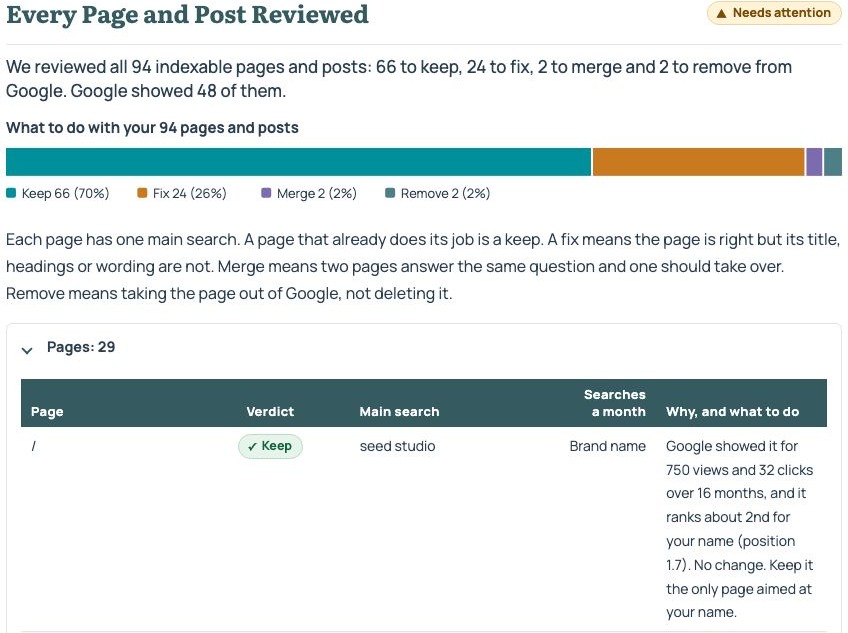
If you want a content audit template, the one above is more or less it: a table with one row per page, a column for the main search, and a column for your verdict.
Are your pages competing with each other?
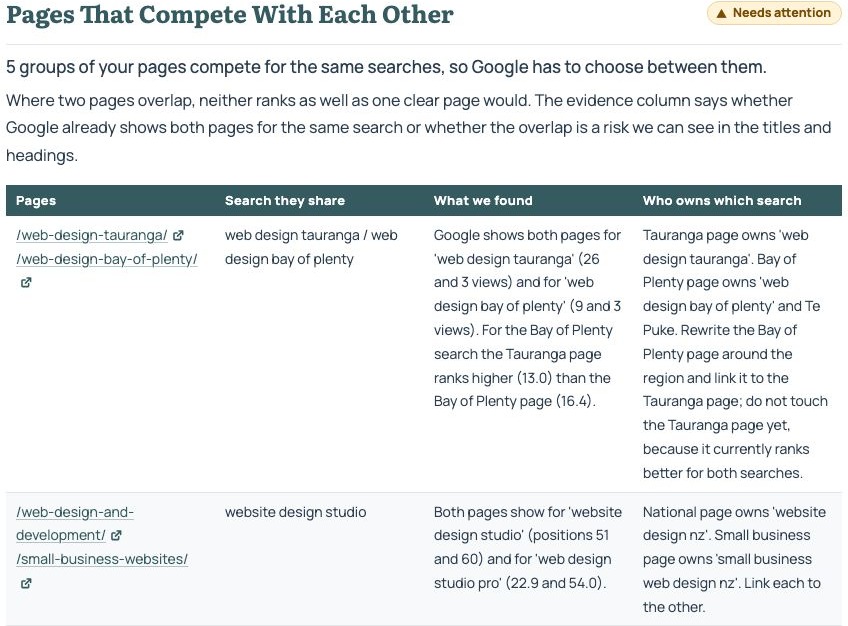
This is the one most small sites miss. When two pages go after the same search, Google has to choose between them, and sometimes it picks the weaker one.
Look down your list for pages that share a main search. Pick one to be the page for that search and merge the other into it.
It’s the reason I like giving every page one main search. It stops you writing a fourth post on the same topic because you forgot the first three.
What pages and questions is your site missing?
Also look for the questions your customers ask that you haven’t answered.
Those questions are searches too, and a clear page or post for each gives you something to be found for.
Start with the questions you already get by phone and email, then check them against what people really type into Google.
Search Console helps here, because it shows the searches that already bring people to you.
Anything you’re showing up for but have no proper page on is a good place to start.
In what order should you fix things?
Don’t try to fix everything at once. Sort the fixes by how much they matter, so the pages closest to enquiries come first.
Then spread any new pages and posts over a few months so you’re not writing it all in one go.
A 3 to 6 month plan is realistic for most small businesses, and it’s the length of calendar our report gives you.
For the pages that matter most, write a short brief before anyone starts writing: the main search, the questions the page should answer, and what you want the reader to do next.
Whether you’re writing it yourself or handing it to someone else, a brief saves a lot of rewriting.
Why did we build the Content Review & Plan?
Because most of our clients don’t know reports like this exist.
I wanted businesses to be able to plan their website content from real search data.
Each Google tool tells you something different.
- Google search trends tell you when to do things.
- Search Console tells you what people search for to find you.
- Analytics shows what they do once they’re on your site.
- Google Ads fills the gaps, for the searches you’re not reaching yet.
The Content Review & Plan is built on Google search results and volumes, plus Search Console if you give access, so you see what people search for and how often.
A content audit with those numbers beside it is a lot more useful than one done on gut feel.
What do you get in the Content Review & Plan?
If you’d rather not spend your weekends in a spreadsheet, here’s what the report covers.
It’s built from a crawl of every page and post on your site, Google search results and volumes, and Search Console if you give us access.
- Every page and post reviewed, with a verdict of keep, fix, merge or remove.
- Next to each one is its main search, so your pages stop competing with each other.
- The pages you’re missing, and the questions your customers ask Google that you can answer on your site.
- A 3 to 6 month content calendar, so you know what to do and in what order, and briefs for your most important pages.
The review is a plan for you to follow. Writing the content isn’t included, though we can quote for it.
The report is also set up to be measured: three to six months after your changes go live, our Traffic & Enquiry Report shows what changed in visits and enquiries.
Who is a content audit for?
The report is made for service and brochure websites, and for the blog on an online shop.
If you have a site that’s been running a few years, a pile of blog posts you can’t remember writing, or a website that gets traffic but not enquiries, it’s a good fit.
A site with only a handful of pages usually doesn’t need a formal audit.
You can do the steps above in an afternoon.
What do we need from you?
Just your website address.
Access to Search Console makes the review more accurate, so if you have it, share it, but you can still order without it.
A rough count of your pages and posts is fine when you order. If you’re not sure, send us your website address.
What should you do next?
If you want to do it yourself, start with step 1 today: list every page and post, and give each a main search.
If you’d rather we did it for you, see the Content Review & Plan page for what’s included, or browse all our reports if you’re not sure which one fits.
And if your pages are fine but your website itself is slow or hard for Google to read, the Technical SEO Report is the better place to start.
Frequently asked questions
How do you do a content audit?
Knowing how to do a content audit comes down to one question, asked of every page and post on your site: keep it, fix it, merge it or remove it? You can do it yourself with a spreadsheet and a few free tools.
What is a content audit template?
A table with one row per page, a column for the main search, and a column for your verdict.
What does a website content audit checklist include?
List every page and post. Give each page one main search. Check how Google is treating each page. Then decide: keep, fix, merge or remove.
Why do pages on the same website compete with each other?
When two pages go after the same search, Google has to choose between them, and sometimes it picks the weaker one. Pick one to be the page for that search and merge the other into it.
In what order should you fix things after a content audit?
Don’t try to fix everything at once. Sort the fixes by how much they matter, so the pages closest to enquiries come first. A 3 to 6 month plan is realistic for most small businesses, and it’s the length of calendar our report gives you.