

Where your ad money is going
If your Google Ads are not working, the usual reason is that you’re paying for the wrong searches, or sending the right searches to the wrong place.
Google is doing what you told it to, just not what you meant. Below are the usual causes, and how our Google Ads Plan lays out the fix.
It’s a report on how your Google Ads should be set up to bring in leads or sales.
What you’re paying for
Google Ads are the paid results at the top of Google.
Your website won’t show up for every search on its own, especially when bigger businesses hold the top spots.
Ads fill the gaps, so you can appear for searches you’re not reaching yet.
You just need to pay for the right ones.
Send each ad to the page that answers the search, not to your home page.
Are my Google Ads actually running?
Start with the boring checks, because they take five minutes.
- Is the campaign paused?
- Has the daily budget run out by mid-morning?
- Has Google rejected an ad?
- Is the billing set up properly?
If your ads are not showing at all, one of these is nearly always the reason, and it’s worth ruling out before anything else.
You’ll find each one inside your own Google Ads account.
If all of that looks fine and the ads are running, keep reading. That’s where most of the real trouble sits.
Why are my Google Ads not getting clicks or enquiries?
Most of the time, the ads are showing for searches that were never going to turn into a customer.
Say you’re a plumber and your ad shows for “how to fix a leaking tap”.
Plenty of people search that. Hardly any of them want to hire you.
You pay for the click and nothing comes of it.
Google also lets you choose how closely a search has to match the words you’ve picked, and loose matching can pull in searches you’d never choose yourself.
That’s why a list of searches to block matters as much as the list you go after.
Open the search terms report in your account and read what people actually typed before they clicked.
It’s the quickest way to see what you’ve been paying for.
Often the budget is big enough but going to the wrong places.
I’ve never thought there’s any point advertising and wasting budget on things that don’t match what people are looking for.
Why are my Google Ads not converting?
A “conversion” just means someone did what you wanted: filled in the form, rang you, bought something.
If people click and don’t convert, look at two things.
Where the click lands
If someone searches “emergency electrician” and lands on your home page, they have to hunt for what they came for.
Most won’t. The page they land on should answer the search they just typed, so each group of searches is better sent to the page that matches it.
The ad itself
The words in the ad make a promise, and the page has to keep it.
If the ad says one thing and the page says another, people leave.
There’s one more reason. You can’t tell what’s working if you can’t see what visitors did after the click.
That’s why we ask for access to Google Analytics, not just your ad account.
Does how my account is set up matter?
Yes. Ads work best when searches are grouped tightly, so each group has its own ads that say the right thing.
One big campaign for everything usually means vague ads and a budget that gets spread thin.
Budget is the same story. Search numbers in New Zealand are small compared with overseas, which is normal for a country our size.
So it pays to know roughly how many people search for what you sell each month, and what each click costs, before you decide how much to spend.
Guessing at a daily budget is how people end up either starving a good campaign or feeding a poor one.
How can you tell which searches are worth paying for?
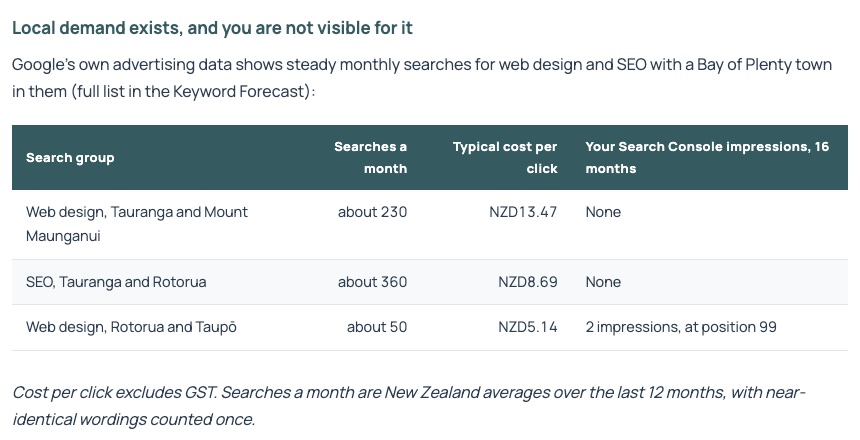
You look at real numbers: how many people search each month, and what a click costs.
Here’s a small example from our own Google Ads Plan for Seed Studio. It lists groups of searches, how many happen a month, the typical cost per click, and whether the website currently shows up for them in Google, so you can see where paying makes sense.
Why did we build the Google Ads Plan?
Most of our clients don’t know these reports exist, and I think they should.
We built them on real search data from Google.
Each Google tool answers a different question.
- Google search trends tell you when to do things.
- Search Console shows what people search to find you.
- Analytics shows what they do once they’re on your site.
- Google Ads fills the gaps for the searches you’re not reaching yet.
The Google Ads Plan is the one that pulls those together for your ads, so you’re not choosing searches and budgets by feel.
What do you get in a Google Ads Plan?
The plan answers one question: how should your Google Ads be set up to bring in leads or sales?
It’s a document, and it’s built from your Search Console and Google Analytics data plus Google Ads search volumes and click costs, competitor ads, and your Google Ads account if you link it.
If you already run ads, it starts with where your account stands now, what’s working and what’s wasting money.
Then it gives you the searches worth paying for, with monthly searches and cost per click, like the table above.
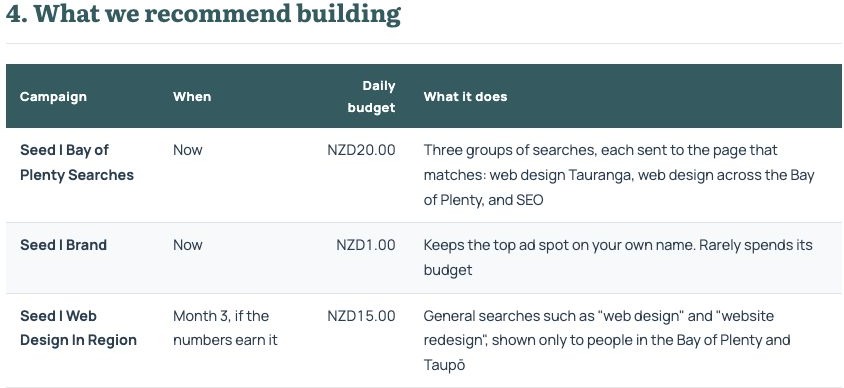
After that it covers how to set up your campaigns and how to split your budget between them.
Here’s what the campaign layout looks like in our own plan:
- Ad copy ready to paste, and the searches to block, so you can stop paying for the “how to fix a leaking tap” clicks.
- Step-by-step instructions you follow in your own account.
- If you run an online shop, Google Shopping and Performance Max are set up too.
Who is the Google Ads Plan for?
It’s made for businesses starting Google Ads, or running ads that aren’t paying off.
If you’ve never run an ad, you’re covered, and if you’ve been paying Google for a year and can’t point to what it’s bought you, you’re covered too.
The plan is a document you follow yourself.
It doesn’t include building or running the ads for you. Managed Google Ads is a separate service, listed on the product page.
What do we need from you?
Access to Search Console and Google Analytics, and your Google Ads account linked to us if you have one.
If you’re not running ads yet, there’s nothing to link. The details, including how it’s ordered, are on the Google Ads Plan page.
What can you do today if your ads aren’t working?
You don’t need a report to make a start. Work through this in order.
- Check the ads are actually running.
- Read the search terms people typed before they clicked, and write down the ones you’d never want.
- Look at the page your best ad sends people to and ask whether it answers the search.
- Split your searches into tighter groups, each with its own ad and its own page.
If that feels like a lot, or you’d rather have it done from real numbers, that’s what the plan is for.
Is it the ads, or is it your search results?
Sometimes ads aren’t the problem at all, and your website just isn’t showing up for the searches that matter.
If you don’t know which searches those are, the Search Opportunity Report shows who your real competitors are in Google and the searches that matter, grouped by product or service, with how many people search each month.
You can see all of our reports on the reports page, and if you’re not sure which one fits, send us your website from the product page.
Frequently asked questions
Why are my Google Ads not working?
Most of the time, the ads are showing for searches that were never going to turn into a customer. Often the budget is big enough but going to the wrong places.
Why are my Google Ads not showing?
Check the basics first: is the campaign paused, has the daily budget run out by mid-morning, has Google rejected an ad, and is the billing set up properly?
Why are my Google Ads not getting clicks or enquiries?
Open the search terms report in your account and read what people actually typed before they clicked. It’s the quickest way to see what you’ve been paying for.
Why are my Google Ads not converting?
The page they land on should answer the search they just typed, so each group of searches is better sent to the page that matches it. If the ad says one thing and the page says another, people leave.
How can you tell which searches are worth paying for?
You look at real numbers: how many people search each month, and what a click costs.