
What keyword research means
A keyword is just what someone types into Google.
Keyword research means finding out which of those phrases your customers use, how many people use them each month, and which ones you have a real chance of winning.
You can start with a pen and paper.
We built the Search Opportunity Report to do this properly for a website, so I’ll explain how it works as we go.
The steps below work with or without it.
Narrow searches like “emergency plumber Tauranga” get fewer searches, but the people typing them are closer to buying.
Why did we build a report for keyword research?
Most of our clients don’t know these reports exist, which is part of why I’m writing this.
I built them because I wanted businesses to plan from real search data.
Each Google tool answers a different question.
- Google search trends tell you when to do things.
- Search Console shows what people search to find you.
- Analytics shows what they do once they’re on your site.
- Google Ads fills the gaps, because it shows you searches you’re not reaching yet.
Keyword research is where those pieces start to join up, because you can’t decide where to put your effort until you know what people are actually searching for.
How to do keyword research: what do your customers type into Google?
Start with your own list
Every product or service you offer. Then write down what a stranger would type to find each one, using their words, not yours.
You call it “bathroom renovation”. They might type “bathroom makeover cost”.
Google helps here for free. Type the start of a phrase and look at the suggestions that drop down below the search box.
Scroll to the bottom of a results page and read the “related searches”.
Both come from what real people search, so they’re a good check on your own list.
Don’t try to be clever at this stage. Write down too many phrases rather than too few.
You’ll cut the list shortly.
Pay attention to how specific a phrase is
“Plumber” is broad, and the person typing it could want anything.
“Emergency plumber Tauranga” is narrow, and that person is ready to ring someone tonight.
Narrow phrases usually have smaller numbers, but the people behind them are closer to buying, so they’re often the better place for a small business to start.
How many people search for it?
Google’s Keyword Planner (free with a Google Ads account) shows an approximate number of searches a month for a phrase.
In New Zealand, expect small numbers. A phrase with 70 searches a month can be a good one, because those 70 people know what they want.
Don’t be put off if you never see thousands.
What matters is comparing phrases against each other. Group them by what they’re about, one group per product or service, so you’re not chasing the same idea twice.
When you’re done you should have a short list per service, each phrase with a rough monthly number beside it.
Which searches are hard to win?
Some searches are crowded. If big businesses hold every spot on the first page, a small site is unlikely to break in this year.
Other searches have less competition, and those are the ones to go after first.
You can get a feel for this by hand. Search the phrase and look at who ranks.
Are they strong, well-known businesses, or smaller sites like yours? If it’s mostly the first kind, put that phrase lower on your list.
In a Search Opportunity Report, the searches that matter are grouped by product or service, and each one shows how many people search it each month and how hard it is to win.
It also shows where you rank now, and which searches are worth going after.
The picture below is from our own report, run on our own website, so you can see the layout.
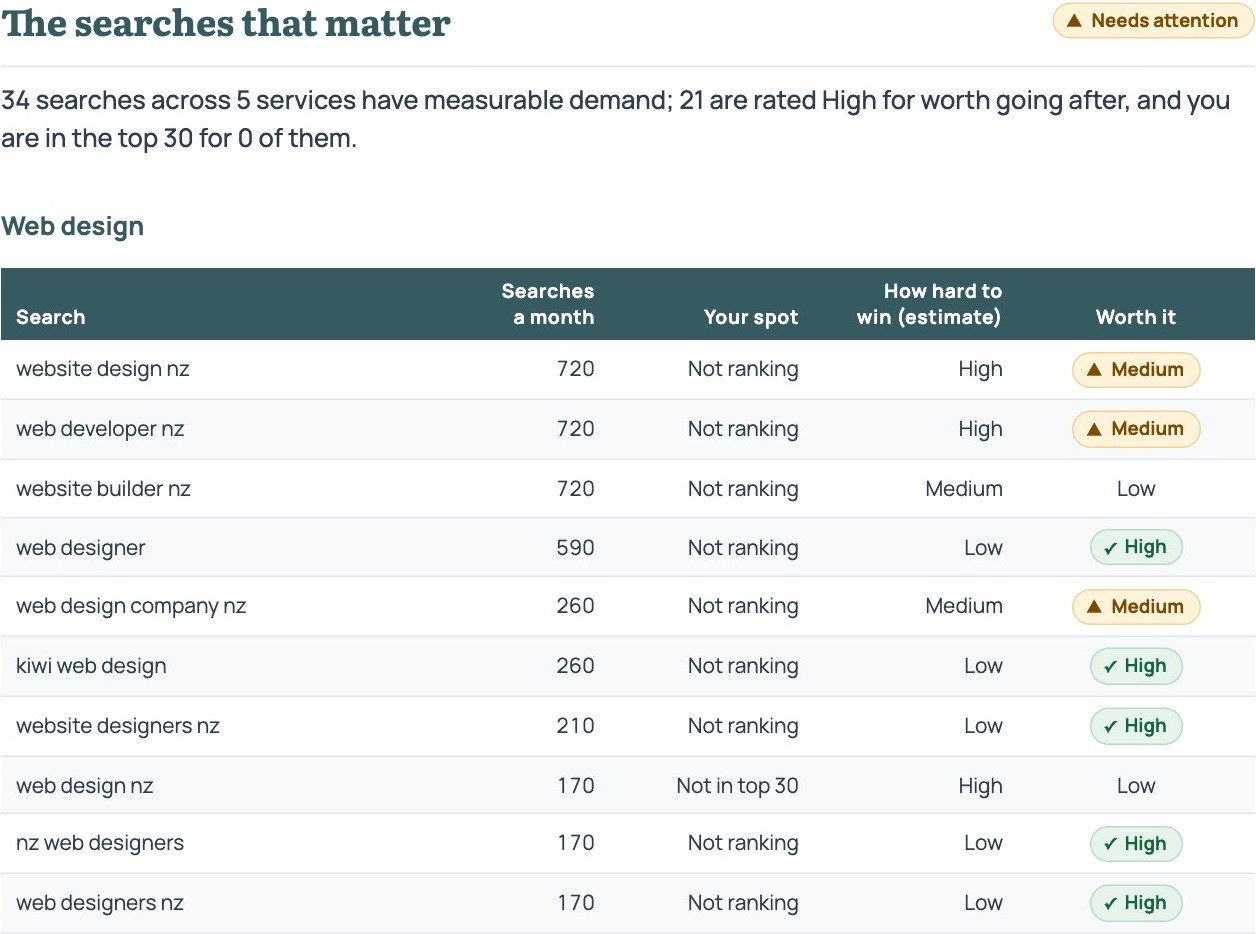
From Seed Studio’s own report. The last column marks which searches are worth going after.
How do you find your competitors’ keywords?
First, work out who your real competitors are in Google. They aren’t always the businesses you’d name over a coffee.
They’re the ones Google shows when your customers search. Try a few of your key phrases in a private window and note who keeps appearing.
Then look at what those businesses are winning that you aren’t. That’s competitor keyword research, spotting the searches someone else owns because they’ve written a page for it and you haven’t.
Doing this by hand works for a handful of phrases and gets tedious fast.
The report does it for you: it names who your real competitors are in Google, and shows what each one is winning.
When do customers search for what you offer?
Searches aren’t steady. People look for some things at certain times of year, and the businesses that do well are usually the ones that were ready before the rush.
Google Trends is free and shows this. Check a few years, not one, so you don’t mistake a one-off spike for a pattern.
Once you know the timing, you know when to publish a page, change your website or start an advert, rather than guessing.
That’s the “when do customers search for this” question, and it’s the one I find most owners have never looked up.
Do Google’s AI answers change keyword research?
A bit, yes. For many searches Google now shows an AI-written answer above the usual results, and it names certain businesses.
If your business isn’t mentioned, fewer people will find you from that search.
The Search Opportunity Report shows whether Google’s AI answers mention you, and who they mention instead.
You can check a few of your own phrases by hand to see it for yourself.
What do you get in a Search Opportunity Report?
It starts from your website address, and nothing else. We pull in Google search results, monthly search volumes and click costs, competitor websites and Google’s AI answers, and put them together into one report.
- Who your real competitors are and what each is winning.
- The searches that matter, grouped by product or service, with monthly numbers and how hard each is to win.
- Where you rank now and which searches are worth going after.
- Whether Google’s AI answers mention you.
- Which value, delivery and location searches people actually use (searches such as “near me” or ones about delivery).
- Copy changes for your key pages, ready to paste, plus one ranked action list so you know what to do first.
Who is it for?
It suits a business deciding where to focus its website, content or campaigns.
It’s also useful for marketers and copywriters working for a client who want solid numbers behind a recommendation.
If you’re not sure whether you need it yet, do the pen-and-paper version above first.
If it turns up more than you can sort by yourself, that’s when the report is worth it.
What does the report leave out?
Two things. It doesn’t include your real visits and sales (that’s what the Technical SEO Report is for), and it doesn’t write the copy for you.
The copy changes it gives you are ready to paste, but turning them into finished pages is your job.
What should you do with the list?
Pick a handful of searches that people really make and that you can win.
Then make sure a page on your website is clearly about each one. Look at the words in the page title and the headings first, because that’s where Google looks.
If a search you want has no page on your site at all, that’s your first job.
Put the list in order, do the easiest wins first, and look at your numbers again in a few months to see what moved.
The full set of reports is on our reports page, and the Search Opportunity Report page explains this one in more detail.
Frequently asked questions
How do you do keyword research for a small business?
Start with your own list: every product or service you offer. Then write down what a stranger would type to find each one, using their words, not yours.
How many people search for a keyword in New Zealand?
In New Zealand, expect small numbers. A phrase with 70 searches a month can be a good one, because those 70 people know what they want.
Which searches are hard to win?
Some searches are crowded. If big businesses hold every spot on the first page, a small site is unlikely to break in this year.
How do you find your competitors' keywords?
First, work out who your real competitors are in Google: the ones Google shows when your customers search. Then look at what those businesses are winning that you aren’t.
When do customers search for what you offer?
Searches aren’t steady. People look for some things at certain times of year, and the businesses that do well are usually the ones that were ready before the rush.
Do Google's AI answers change keyword research?
A bit, yes. For many searches Google now shows an AI-written answer above the usual results, and it names certain businesses.