
Usually one of two things
If you’re asking why your products are not showing on Google Shopping, it’s usually one of two things.
Either Google hasn’t accepted your products, or it has and the product pages behind them aren’t giving it much to work with.
They need different fixes, so it pays to work out which one you’ve got before you change anything.
I built the Product & Shopping Review to check both sides, and I’ll explain below what it covers.
You’ll also get a few checks you can do yourself this week, whether or not you ever order it.
Approved in Merchant Center only means Google has let your products in. It doesn’t mean shoppers will see them.
What is Google Shopping, and what is a feed?
When someone searches for a product, Google often shows a row of products with photos, prices and shop names, above or alongside the usual website results.
That’s Google Shopping.
You send Google a list of them, called a feed, through a free Google tool called Merchant Center.
Each product in the feed has a title, a price, a picture and some other details.
Google checks every product, and anything it doesn’t like gets left out.
So if you’re wondering how to get products on Google Shopping in New Zealand, that list is where it starts.
If it’s wrong, or half empty, nothing else you do will matter much.
Why are my products not showing on Google Shopping when they’re approved?
Merchant Center says your products are fine, and yet nothing turns up when you search for them.
Approved only means Google has let the products in. It doesn’t mean shoppers will see them.
Google still decides which products to show for each search, and it uses what it can read from your feed and your website to decide.
A bare title, a thin description or a category page that looks the same as another one gives it very little to match against what people type.
That’s why I think of this as two separate questions.
First, did Google accept the products?
Second, once they’re in, are they set up so the right shopper can find them?
Most guides only deal with the first.
Has Google rejected my products, or are details missing?
Check this first, because it’s free and quick. Open Merchant Center and look for products marked as not approved.
Google tells you the reason next to each one.
The Shopping part of the Product & Shopping Review looks at exactly this: rejected products, missing details, your free listings and in-store stock.
Free listings are the product results you don’t pay per click for. Ads are the paid version, so it helps to know whether your free listings are working before you spend anything on ads.
A rejected product won’t show at all. Missing details can be just as quiet.
If you’ve got a few hundred products, one small gap repeated across all of them can hide a lot of your shop without any single product looking broken.
Are my product titles and descriptions what shoppers search for?
You can have a perfectly approved product that nobody sees, because the title is “Kettle” and people are searching for “blue enamel kettle 1.5 litre”.
The review checks your category and product pages against what shoppers search for, using Google search volumes.
Then it gives you titles, descriptions and category intro copy with the fixes ready to paste in.
You don’t get a note saying “improve your titles”. You get the actual words.
A category intro is the short bit of text at the top of a category page, such as “Kitchen” or “Garden tools”.
Shops often leave it empty, which means the page that should rank for a broad search has almost nothing on it.
Are two of my category pages competing with each other?
If you’ve added products for a few years, you’ve probably ended up with category pages that overlap.
“Cookware” and “Pots and pans” might both be chasing the same search. Google has to pick one, and it may not pick the one you’d choose.
The review looks for category pages that compete with each other, and tells you which to keep.
I like this one because you don’t have to add anything. You’re sorting out which page deserves to be found, which is often free to fix.
Does my delivery and price wording say the same thing everywhere?
Shoppers notice when a price or delivery promise changes between one page and the next.
They lose trust, and they leave. So the review checks your delivery and price wording to make sure it says the same thing everywhere.
It’s dull work, and it’s the sort of thing that’s easy to get slightly wrong when you’ve been adding products and changing offers for years.
A free-shipping line on one page and a flat rate on another is how it usually happens.
What does the review look like?
Here’s a sample, using a made-up shop called Harbour Kitchen with made-up products.
Nothing in it is from a real business.
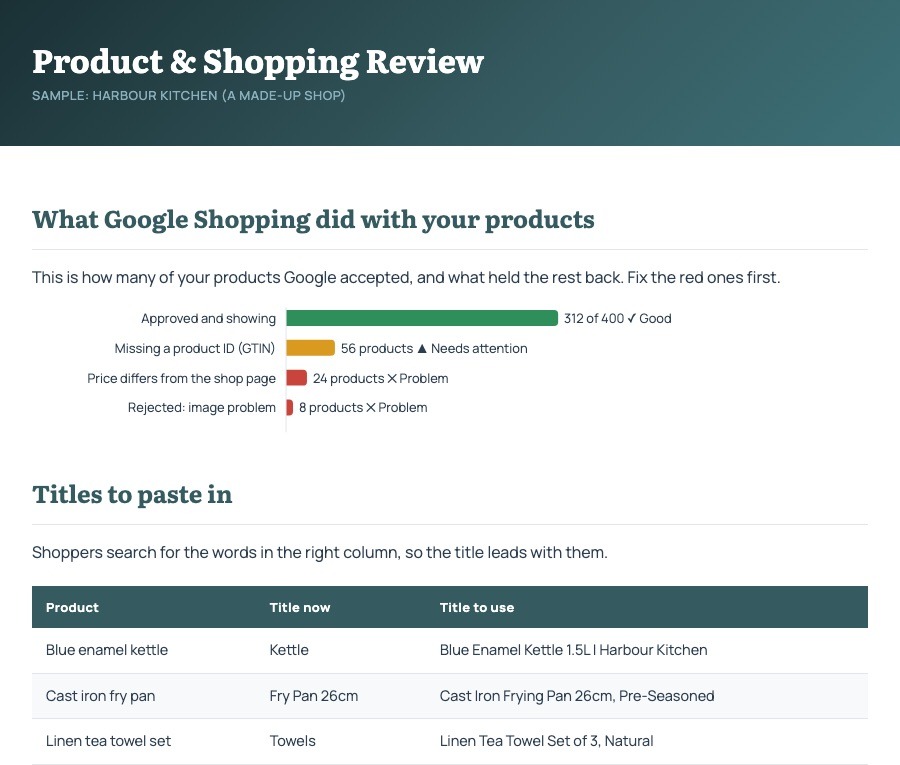
The chart shows what Google did with the products and what held the rest back.
The table gives you the wording to paste into your shop. The real review also gives you step-by-step fixes, so you know what to do and in what order.
Why did I build this?
Mostly because clients don’t know these reports exist, and a business owner rarely hears that they can ask for one.
The other reason is that I want businesses to plan from real search data.
- Google search trends tell you when to do things.
- Search Console shows what people search for to find you.
- Analytics shows what they do once they’re on your site.
- Google Ads fills the gaps, for the searches you’re not reaching yet.
The Product & Shopping Review is the one for your shop. It looks at your category and product pages, Google search volumes and your Merchant Center feed, so you’re fixing what’s actually wrong instead of guessing.
You can see the whole set on the Seed Studio reports page.
Who is this for?
It’s for online shops, such as Shopify and WooCommerce stores and similar.
If you sell products on your website, and you’re not sure why Google isn’t showing them, that’s the situation it’s built for.
You can order by the number of products in your shop: up to 100, 101 to 1,000, or 1,001 to 5,000.
A rough count is fine, and if you’re not sure, you can send your website.
Larger shops over 5,000 products can ask for a quote.
What do you need to get a review?
We need your website address. For the Shopping part, we also need access to Google Merchant Center and your shop admin.
The review is usually delivered in about 5 business days once we have what we need, depending on workload.
Two things it doesn’t cover. Your blog is a different report, the Content Review & Plan, and product photos aren’t part of it either.
The fixes are yours to do, or whoever looks after your shop can do them.
Where should you start this week?
Three quick checks, none of which cost anything:
- Open Merchant Center and count how many products aren’t approved, and read the reason Google gives.
- Pick your five best sellers and compare the price and delivery wording on each product page with what your category page and cart say.
- Read the titles of those same five out loud. Would a shopper type those words?
If those checks turn up more than you want to untangle yourself, have a look at the Product & Shopping Review page for the full detail.
Frequently asked questions
Why are my products not showing on Google Shopping?
Either Google hasn’t accepted your products, or it has and the product pages behind them aren’t giving it much to work with. They need different fixes, so it pays to work out which one you’ve got before you change anything.
How do I get products on Google Shopping in New Zealand?
You send Google a list of them, called a feed, through a free Google tool called Merchant Center. Each product in the feed has a title, a price, a picture and some other details. Google checks every product, and anything it doesn’t like gets left out.
Why are my products not showing on Google Shopping when Merchant Center says they're approved?
Approved only means Google has let the products in. It doesn’t mean shoppers will see them. Google still decides which products to show for each search, and it uses what it can read from your feed and your website to decide.
Why are my products not showing in Google Merchant Center?
Open Merchant Center and look for products marked as not approved. Google tells you the reason next to each one.
What is the difference between free listings and Google Shopping ads?
Free listings are the product results you don’t pay per click for. Ads are the paid version, so it helps to know whether your free listings are working before you spend anything on ads.