
Getting listed is the easy part
If you’re wondering how to get your business on Google Maps, the first step is a free Google Business Profile.
Plenty of owners have one and still don’t show up when someone nearby searches for what they do.
Setting up a profile gets you listed. Being shown is a separate job.
The profile exists, the website is fine, and yet the business down the road keeps turning up in the little map at the top of Google.
Below is what’s usually going on, and how to check it yourself. We’ve also built a Local SEO Report that checks all of this for you, using live Google Maps results rather than guesses.
A Google Business Profile gets you listed on Google Maps. Getting shown when people nearby search is the harder part.
What does “showing on Google Maps” actually mean?
When someone searches for something like “plumber near me”, Google puts a map at the top with a short list of local businesses.
People call these the local results. Those few businesses get the first look, and plenty of people never scroll past them.
So “not showing” can mean three different things.
- You might not have a profile.
- You might have one that Google doesn’t think matches the search.
- You might be there, but a few places below the businesses people actually see.
Each one has a different fix, so work out which one you have first.
How do you get your business on Google Maps?
Create a Google Business Profile, fill in every part of it, and verify it so Google knows the business is really yours.
That gets you listed. Google’s own help pages walk you through the steps and they’re free, so I won’t repeat them here.
After that it gets harder. Google says it decides local results using relevance (how well your profile matches the search), distance (how close you are to the person searching) and prominence (how well known you are).
You can’t change the distance, but you can work on the other two, and that’s where most of the checks below sit.
How do you check where you really appear?
Search for what you do, the way a customer would, and look at the map results.
Then do it again with the town added, and again for each service you care about.
Write down where you appear for each one, and who shows up above you.
Searching on your own phone, at your own shop, will flatter you, because Google favours what’s near the person searching.
Ask a friend in another part of town to try the same searches and compare notes.
Why is my business not showing on Google Maps?
I’d check these first, in roughly this order.
Your categories
A Google Business Profile has a main category, like “Plumber” or “Cafe”.
If it’s wrong or too vague, Google doesn’t know which searches you belong in.
Look at what the businesses above you have chosen.
Your name, address and phone number
Google compares your details across the web.
If your phone number is different on your website, your profile and a couple of directories, you look less certain to Google.
Even small differences, like “Rd” in one place and “Road” in another, are worth tidying.
Your reviews
Look at how many reviews the businesses above you have compared with yours, how good their star ratings are, and how recent.
It won’t be the only thing, but it’s often the clearest gap.
Your opening hours, photos and details
If your hours are missing or out of date, or you have two photos from 2019, you’re giving Google and customers less to go on.
If you travel to customers, say where.
Whether you’re verified
An unverified profile can sit there doing very little.
Google doesn’t publish a neat list of what counts most, and nobody outside Google knows the exact weighting.
So treat anything that promises a guaranteed ranking with suspicion.
How do you rank higher on Google Maps once you’re on it?
Fix the basics above, then compare yourself with the businesses above you, one at a time.
If they have the right category and you don’t, change yours. If they have far more reviews, that’s a job to work on steadily rather than all at once.
If their phone number matches everywhere and yours doesn’t, start tidying.
Do it by comparison, search by search, rather than guessing. What matters for a cafe in town isn’t the same as what matters for a trade that travels, and a business can be in the top three for one search and nowhere for the next.
What does a Local SEO Report check?
The Local SEO Report checks whether you show up in Google Maps when people nearby search for what you do.
Here’s what’s in it.
- Where you appear. It shows your position in Google Maps for the searches that matter to you. That’s the part most owners haven’t seen before, because it’s hard to check properly yourself.
- Your Google Business Profile, against the competition. It checks your profile against the businesses above you, so you can see what they have that you don’t.
- Your reviews. It compares your reviews with your competitors’, so you can see the size of the gap instead of guessing at it.
- Your name, address and phone. It checks them across directories, which is where mismatches tend to hide.
- What to do about it. You get one ranked fix list and a 30-day plan, so you know what to do first.
The data comes from live Google Maps results, your Business Profile, your reviews and directory listings.
Here’s a made-up example of the kind of results chart you’d see, with a fictional plumber, so you can picture it.
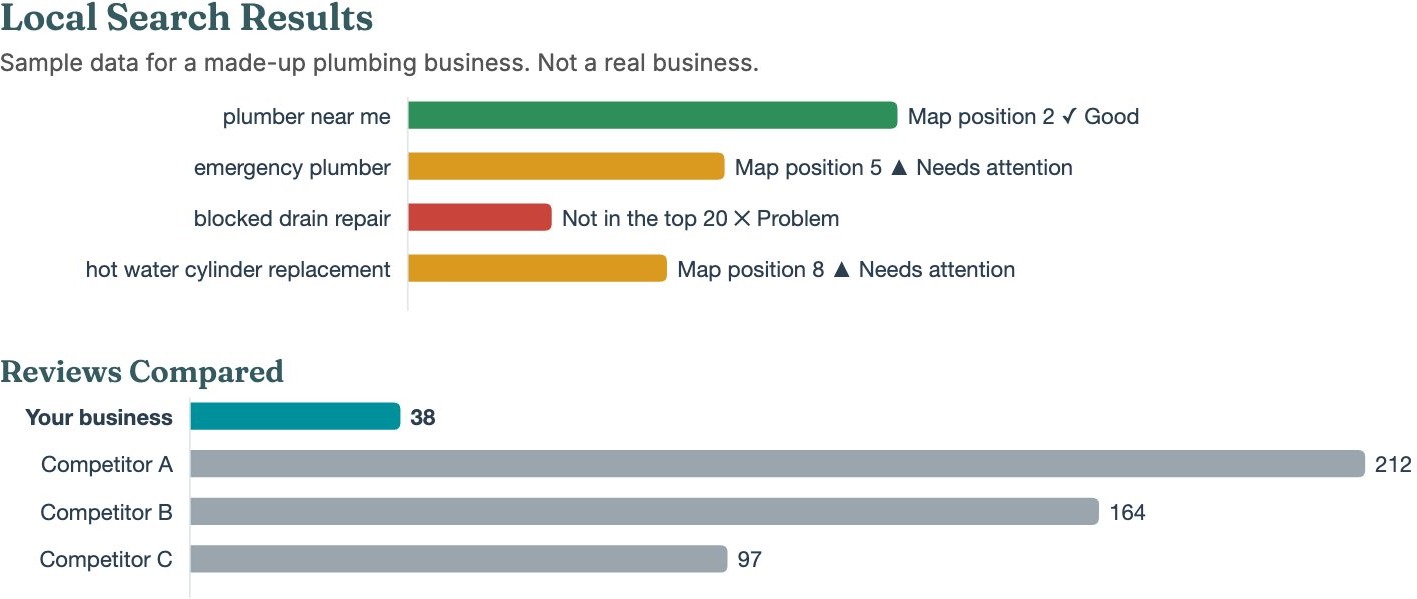
Sample data for a made-up business. Not a real business or real results.
Who is the Local SEO Report for?
It’s for businesses that rely on local customers: trades, clinics, cafes, shops and services.
If people find you by searching nearby, it’s for you. If you sell only online to the whole country, it isn’t the right one.
It counts locations, and one location is one town or one shopfront. If you cover a few towns, you can have a few locations covered.
The product page has the options, and the report is usually delivered in about 5 business days once we have what we need, depending on workload.
What do we need from you?
Nothing. Tell us the searches you care about, or we work them out.
If you’re not sure, send us your website.
What isn’t included?
The report doesn’t check your website itself. That’s in the Technical SEO Report, which includes the Local SEO Report.
It also doesn’t fix anything for you. You get the ranked list and the 30-day plan, and the doing is up to you or whoever looks after your profile.
Why did we build it?
Most of our clients don’t know these reports exist, which is one reason I’m writing about them.
The other is that I wanted businesses to plan from real search data.
Each report answers a different question. Google search trends tell you when to do things.
Search Console tells you what people search to find you. Analytics shows what they do on your site.
Google Ads fills the gaps for searches you’re not reaching yet. The Local SEO Report is the Google Maps piece: whether the people nearby, searching for what you do, are finding you or the business down the road.
You can see the whole set on our reports page.
What can you do this week?
You don’t need a report to start. Do the searches yourself, from somewhere other than your shop.
Write down where you appear and who’s above you. Check your main category and your phone number on your website, your profile and one directory.
Count your reviews against the top three. Then pick the one gap that’s easiest to close and close it.
If you’d rather see it laid out properly, with real positions and a ranked list, that’s what the Local SEO Report is for.
Frequently asked questions
How do you get your business on Google Maps?
Create a Google Business Profile, fill in every part of it, and verify it so Google knows the business is really yours. That gets you listed.
Why is my business not showing on Google Maps?
Setting up a profile gets you listed. Being shown is a separate job. Check your categories, your name, address and phone number, your reviews, your opening hours, photos and details, and whether you’re verified.
How do you rank higher on Google Maps?
Fix the basics above, then compare yourself with the businesses above you, one at a time. If they have the right category and you don’t, change yours.
What are the Google Maps ranking factors?
Google says it decides local results using relevance (how well your profile matches the search), distance (how close you are to the person searching) and prominence (how well known you are). Google doesn’t publish a neat list of what counts most, and nobody outside Google knows the exact weighting.
Do I need a website to be on Google Maps?
No. A Google Business Profile can exist without one, though a website gives Google and customers more to go on.
How long until I show up on Google Maps after fixing things?
It varies, and I wouldn’t promise a date. Recheck the same searches every few weeks and watch the direction, not the daily wobble.